Your Voice,
Your Way
Expressive text-to-speech for voice chat. Give mute individuals and content creators the power to communicate with genuine emotion.
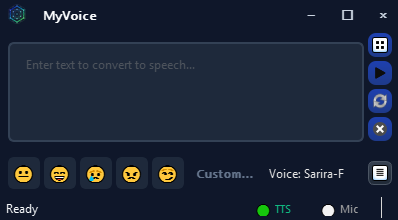
Expressive text-to-speech for voice chat. Give mute individuals and content creators the power to communicate with genuine emotion.
Everything you need to communicate naturally in voice chat
Express yourself with 5 emotion presets or create custom emotional expressions. Convey feelings through tone, not just words.
Create unique voices from text descriptions. Describe a voice and bring it to life - perfect for characters and personas.
Clone any voice from just 3 seconds of audio. Preserve your identity or recreate familiar voices with remarkable accuracy.
Route speech directly to Discord, Zoom, Teams, and any app. Works anywhere a microphone is accepted.
Mix your real microphone with TTS output. Speak naturally and use TTS together through a single virtual microphone.
Save common phrases for instant playback. Perfect for gaming callouts, greetings, and frequent responses.
Hear your speech begin within 1–3 seconds — TTS streams as it's generated rather than waiting for the full clip. Real-time pacing for natural voice chat.
Play a preset audio cue with one tap — built for voice chat where synthesized speech can't pause or politely interject like the real thing. Call attention, signal you're coming through, or break an awkward silence while you compose your next message.
Save your most recent take to a WAV file with one click. Build a sound library, share favorite clips with friends, or archive that perfect read.
Let other apps on your PC drive MyVoice — stream deck macros, chat bots, accessibility tools. An opt-in HTTP server (/v1/audio/speech, /v1/voices, /v1/models) bound to localhost with a bearer key; off by default.
Compiled inference + a persistent on-disk cache deliver near-instant warmups on RTX 30/40/50 series. The first launch primes the cache; every run after loads in seconds.
Powered by embedded Qwen3-TTS. No internet required after setup. Private, secure, always available.
Empowering diverse voices across communities
Join the Conversation
Don't just type - be heard with emotion. Participate in Discord voice channels, Zoom calls, and any voice chat with natural, expressive speech.
Unlimited Character Voices
Create distinct character voices without vocal strain. Switch between personas mid-stream. Build a library of unique voices.
Independence in Minutes
Simple setup that works out of the box. Help your loved one create their voice identity, then step back as they communicate independently.
Every NPC, Unique
Create consistent character voices for immersive tabletop storytelling. Voice your game characters with personality and emotion.
Free, open-source, and ready to use
Updated September 14th, 2026 - Version 2.3.0
Single executable installer with bundled Python environment. Best for most users.
⬇ Download Installer (.exe)No installation required. Extract the .zip and run from any location.
⬇ Download Portable (.zip)Required for Voice Chat: Install VB-Cable (free virtual audio driver) to route MyVoice to Discord, Zoom, and other apps.
The Installer (.exe) will prompt you to download VB-Cable automatically. The Portable (.zip) version does not include VB-Cable and requires a separate download.
Download VB-Cable →Built with amazing open-source technology
Advanced text-to-speech models powering voice synthesis
Speech recognition and transcription
Cross-platform GUI framework
Machine learning framework
MyVoice would not be possible without VB-Cable. Their virtual audio cable software enables the voice chat integration that makes this application useful for real-time communication.
VB-Cable is donationware - please consider supporting the developers!
❤ Support VB-AudioThe 2–3× faster first audio in 2.3.0 started with the Nari Labs team’s research post on the Qwen3-TTS discussion board, their write-up of the speed/cost frontier, and the techniques their nari-qwen3-tts code and container demonstrate — carrying codec state across chunks instead of re-decoding overlap is the change you hear. Thanks also to Andres Marafioti, whose open-source faster-qwen3-tts and its blog showed exactly where a cold start spends its time.
MyVoice is free and open-source. If this tool has helped you, consider supporting its development.